ManuMax EM Request Desktop and ManuMax EM Request Online
Explanation
ManuMax EM Request is a separate program for non-maintenance users to submit maintenance requests to the maintenance department.
ManuMax EM Request Requester's need to set up in ManuMax EM in the Administration/Employees Table
If you purchase ManuMax EM Request, you can use this screen below to setup / manager Express Request Settings.
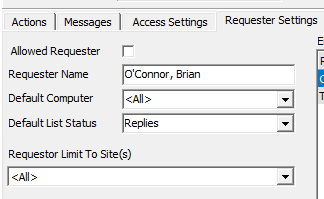
Allowed Requester - Save your requester's information. Click the check box to quickly enable or disable your requester's
Requester Name - The name of the requester
Default List Status - Set which list ExpressRequest will default to when each user logs in. Some other options include Draft, Submitted, and Reviewed. To view the complete list click the drop down arrow.
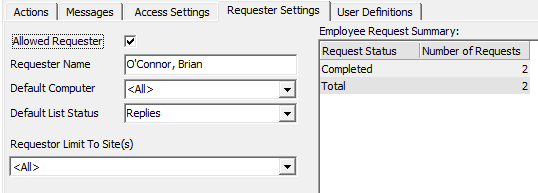
Employee Request Summary
Select the employee and quickly view the history of that employee's request
Data Fields
Request Status - ManuMax EM will display a summary of actions from ExpressRequest. Some other actions include submitted, reviewed, and completed.
Number of Requests - The number of requests in the system from the selected requester.
ManuMax EM Request Online Setup
To Set up ManuMax EM Request Online please submit a support ticket here Create a Support Ticket